Features
The alarm keeps ringing until you solve something
Tapping a button is not the same as waking up, and your half-asleep self is very good at tapping buttons. A mission asks for something a sleeping brain cannot fake.
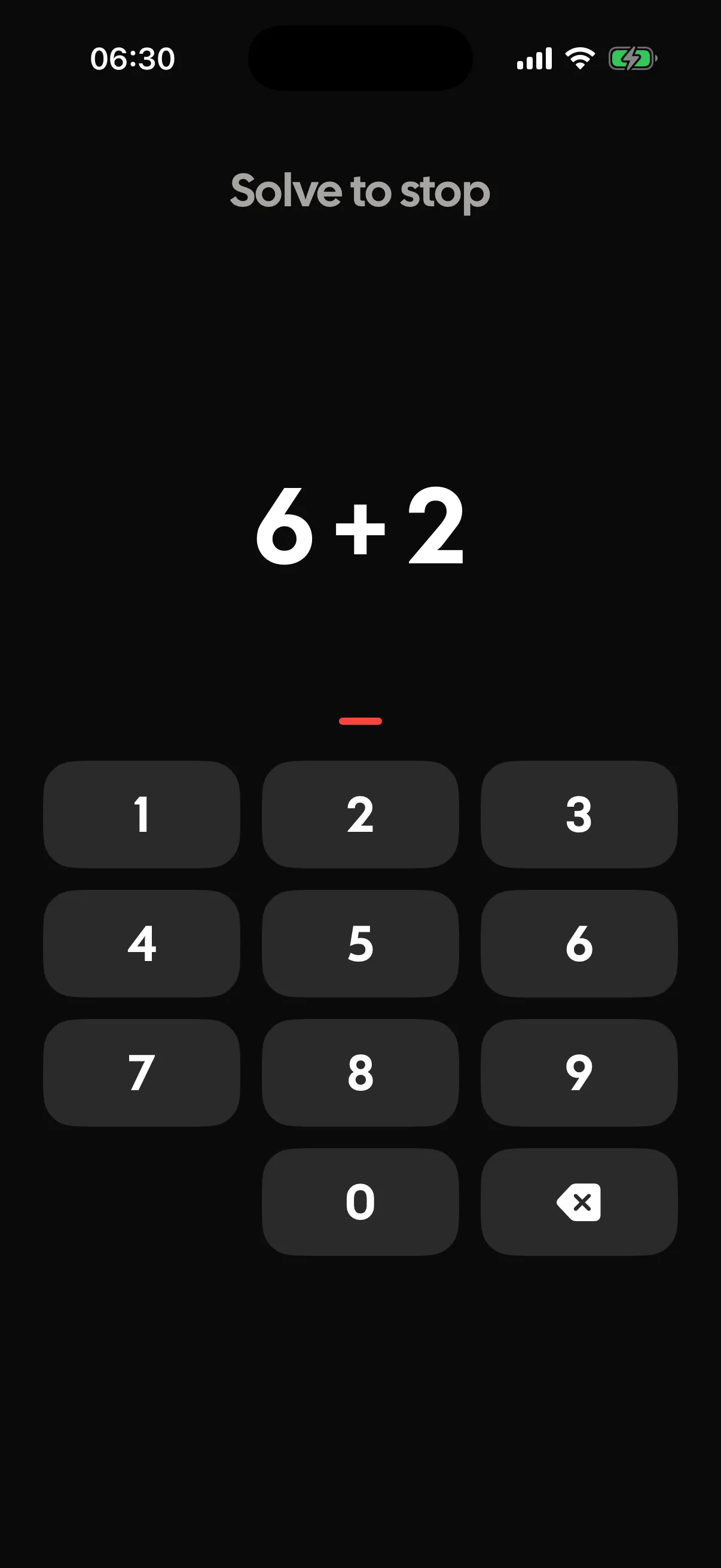
A wake-up mission is a small task that has to be completed before the alarm will stop. Tock ships 9 of them in 3 families: mind, body and place. The alarm keeps ringing the whole time the task is on screen.
- Missions in the app
- 9Missions in the app
- Families to choose from
- 3Families to choose fromMind, body and place
- Mind missions alone
- 5Mind missions aloneMath, Digits, Tiles, Order and Phrase
How it actually works
Why the noise does not stop when your thumb lands
A normal alarm ends the moment you touch it, which is exactly the failure. You can dismiss one without ever being conscious, and half the time you have no memory of doing it. Tock puts a task in the way instead. The alarm carries on ringing while the task is on screen, and the sound only ends when the task is done.
There are 9 missions in 3 families, and the family matters more than the individual mission. Mind missions keep you in bed but make you think: Math, Digits, Tiles, Order and Phrase. Body missions get you moving: Shake, and Steps, which counts real steps through the iPhone pedometer. Place missions get you out of the bedroom: Photo, which asks for a picture of a spot you saved in advance, and Scan, which wants the barcode you chose, usually the coffee tin or the cereal box.
- Pick mind if you wake up fine but drift straight back off
- Pick body if the problem is the ten minutes after the alarm rather than the alarm itself
- Pick place if the bedroom is the trap and the fix is being somewhere else
Missions are on by default, and turning them off is one switch on the alarm.
Choosing a difficulty you will not resent
The most common mistake is setting a mission that is too hard on night one, hating it by Thursday and switching the whole thing off. A mission you complete in twenty seconds while mildly annoyed is working. A mission that has you cursing at a phone at 6am gets deleted.
Start one notch easier than you think you need and move up when it stops working.
Setting up a Photo or Scan mission the night before
Place missions need a target saved in advance, and picking it well is most of the effect. The point is not the photo, it is where the photo makes you stand.
- Choose somewhere you cannot reach from bed, ideally in another room
- Pick a spot with steady light, because a dark corner is hard to match at 6am
- For Scan, use something you touch every morning anyway, like the coffee tin
- Avoid anything portable enough to be dragged back to bed the night before
What pairs well with a mission
Missions run alongside everything else in Tock rather than replacing it. Smart wake decides when the alarm arrives, the wake tone decides how it arrives, and the mission decides what it takes to end it.
A gentle tone with a demanding mission is a good combination for people who hate being startled but still sleep through everything.
Where it stops
Every feature has an edge. Better you read it here than find it at six in the morning.
- A determined person at 6am can beat any of them. Force quitting, a second phone or simply keeping the barcode next to the bed will all work if you want them to.
- Steps needs the phone on you, so it does not suit anyone who leaves the phone charging across the room.
- Photo and Scan both need a target you saved in advance, which means the setup has to happen while you are awake enough to care.
- Missions make the alarm harder to ignore. They cannot make a four hour night feel like an eight hour one.
Questions people ask
Can I still get up in an emergency?
Yes. Tock is an alarm app, not a lock. The mission stands between you and silence, not between you and your phone.
Which mission actually works best?
For most people it is a place mission, because standing in the kitchen is harder to undo than solving a sum in bed. Mind missions work if your problem is drifting off again rather than staying put.
Do missions run on every alarm?
They are on by default and set per alarm, so your weekday alarm can carry a mission while your Sunday one does not.
Does the alarm keep ringing the whole time?
Yes, that is the point. The sound continues while the task is on screen and stops when you finish it.
The rest of the app
The parts that sit closest to this one.
- Alarm on silentTock's alarms are registered with iOS through Apple's AlarmKit framework rather than played by the app in the background. That is why they ring with the ringer off, through a Focus, with Tock closed, on the native full-screen alert.
- Smart wakeSmart wake is a 30 minute window before your alarm in which Tock watches for a lighter moment in your sleep and rings as soon as it finds one. If it never finds one, your alarm goes off at the exact time you set.
- StreaksTock counts a night toward your streak at 90% of your sleep goal, and it bridges one missed night per week automatically. Milestones sit at 3, 7, 14, 30, 60, 100, 180 and 365 nights, drawn as a moon rather than a flame.
- Sleep soundsTock has 63 fall-asleep sounds. You can play four at a time, save the blend as a mix, and 42 of them carry a Far, Near or Close distance control. 22 are bundled recordings and the rest are generated on the phone as you listen, so they never loop.
Elsewhere on the site
Different corner of the same problem.
- Sleep soundsOceanRolling surf is broadband like rain, but it breathes, cresting and receding on a cycle of about ten seconds, and a lot of people find that slow rise easier to let go of than a flat hush. The cost is that the level moves, so it masks less reliably at the quiet end of every cycle than steady noise does.
- Tock for youNew parentsYou do not wake up to an alarm any more, you wake up to a small person, three or four times, and then you have to be a functioning adult by seven. The night is not so much short as it is in pieces.
- AlternativesTock vs Sleep as AndroidSleep as Android is Android only, so an iPhone owner cannot have it at any price. Tock is the nearest thing on iOS in spirit: sleep tracking from the phone, a smart wake window, snore detection and a task before the alarm stops. It is not as deep, and it does not talk to your smart bulbs.
- RoundupsThe best sleep trackers that don't need a watchTock is the best sleep tracker without a watch. Leave the phone on the nightstand and it uses the microphone and accelerometer all night, classifies snores, coughs and sleep talking on device, and hands you a report plus the audio in the morning. SleepScore is the strongest alternative if you would rather nothing listened to the room.
- Wake timesWaking up at 9:00amBedtimes by sleep cycle for a 9:00am alarm.
- Wake tonesLoud alarm soundsTock's alarms ring through silent mode and through a Focus because they are built on Apple's AlarmKit, not on an app keeping audio alive in the background. What no app can do is raise your iPhone's hardware volume for you. Loudness gets your eyes open; the wake-up mission is what stops you dismissing it and going straight back to sleep.
The alarm keeps ringing until you solve something
A wake-up mission is a small task that has to be completed before the alarm will stop. Tock ships 9 of them in 3 families: mind, body and place. The alarm keeps ringing the whole time the task is on screen.