Features
Put the phone on the nightstand and Tock does the rest
Set the phone down, start the night, and the tracking is already running. There is no strap to charge and nothing to remember at 1am.
Sleep tracking in Tock runs on the phone alone. The microphone and the accelerometer stay awake all night, Apple SoundAnalysis labels sounds like snoring, coughing and sleep talking on device, and the clips are saved so you can play them back in the morning.
- Sensors running from lights out to alarm
- 2Sensors running from lights out to alarmMicrophone plus accelerometer
- Wearables required
- 0Wearables requiredThe phone on the nightstand is the whole setup
- Until the good-night screen dims to near black
- 20 secUntil the good-night screen dims to near black
How it actually works
What stays awake while you do not
Two sensors run from the moment you start the night until the alarm. The accelerometer counts how much the surface under the phone moves, which is a workable proxy for how much you move. The microphone streams into Apple SoundAnalysis, the same on-device sound classifier Apple ships in iOS, and that is what turns raw audio into labels like snoring, coughing and sleep talking.
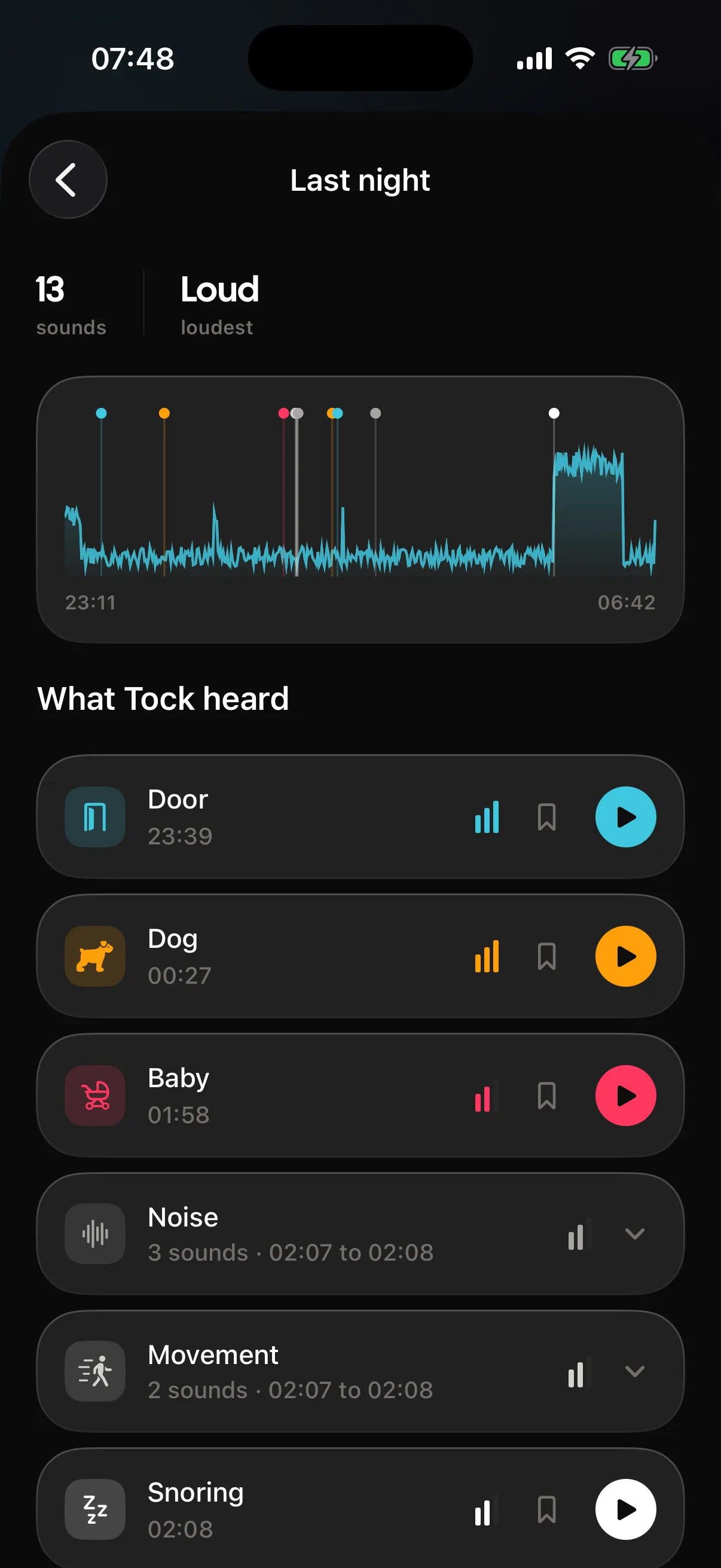
The classification happens on the phone rather than on a server. Tock does not keep eight hours of audio and hand you a file to scrub through. It watches the stream, and when it is confident about what it just heard, it keeps a short clip and pins it to the minute it happened. In the morning the night detail view puts the whole thing in one place: the stretches you slept in, the stats, the estimated stages, anything a wearable contributed through Apple Health, the clips you can play, breathing and room readings, your morning check-in and your tags.
- The good-night screen dims to near black after 20 seconds untouched and stays on until the alarm
- A night broken in two, by a 3am kitchen trip or a feed, still counts as one night
- Every clip stays attached to the night it belongs to, so a bad Tuesday is easy to find again
Stages on a phone-only night are estimated from movement, sound and cycle timing. Measured stages need a wearable writing into Apple Health.
Where to put the phone, and why it matters
Tracking quality is mostly a placement problem. The accelerometer wants a firm surface, the microphone wants a clear line to you, and the battery wants a cable.
- Nightstand height, screen up, within arm span of your pillow
- A hard surface beats a stack of books, and both beat the mattress
- Plugged in, because two sensors and a lit screen will cost you more than a normal night
- Face down or under a pillow is the one setup that reliably makes the audio worse
What the first week tells you and what it does not
One night is an anecdote. Three nights is a hint. A week is the first point at which the pattern in front of you is worth acting on, because a single late dinner or a single noisy street stops dominating the picture.
Track a normal week before you change anything. Then change one thing, and give that a week too.
The settings worth touching on night one
Most of Tock is fine on defaults. Three things are worth a look before you sleep on it for the first time.
- Your sleep goal, because the streak and the score both read from it
- Whether Tock may read Apple Health, which is what pulls in heart rate and a wearable night
- Whether smart wake stays on for your usual alarm, which it does by default
What sharing a bed does to the data
The microphone cannot tell whose snore it just heard, and the accelerometer cannot tell whose turn shook the nightstand. If somebody else is in the bed, some of what you see is theirs. That is worth knowing before you take a chart personally.
Clips include whatever was audible in the room, so treat playback as shared audio and not a private log.
Where it stops
Every feature has an edge. Better you read it here than find it at six in the morning.
- A phone on a nightstand estimates your sleep. It does not measure it the way a clinic does, and the stages you see on a phone-only night are estimates from movement, sound and cycle timing.
- Tock cannot separate you from whoever or whatever else is in the room. A partner, a baby or a dog all land in the same microphone.
- Two sensors and a screen that stays on all night use real battery, so plan on charging while you sleep.
- It is not a medical device and cannot screen for a sleep disorder. If something in your nights worries you, that is a conversation for a doctor.
Questions people ask
Does Tock record my whole night?
No. It classifies the audio stream on device and keeps short clips around the sounds it labelled. The rest is not stored.
Can it track my sleep without me starting anything?
You start the night from the good-night screen. That is deliberate: Tock knows when the night began rather than guessing from when you stopped scrolling.
Does it work in Airplane Mode?
Yes. Tracking and classification both run on the phone. The sleep coach is the one part of Tock that needs a network connection.
Is there a free version?
No. Tock asks for a subscription after onboarding, with a 3-day free trial, from $39.99 a year.
The rest of the app
The parts that sit closest to this one.
- Snore recordingTock keeps short audio clips of the things it hears in the night and pins each one to the minute it happened. Snoring, coughing and sleep talking are labelled by name, and every clip has a play button in the morning.
- Sleep scoreThe sleep score is a single number for a night, sitting at the top of that night detail view. Underneath it are the parts that produced it, and across nights the insights cover 21 metrics in 7 groups plus long-run measures like sleep regularity and sleep debt.
- Smart wakeSmart wake is a 30 minute window before your alarm in which Tock watches for a lighter moment in your sleep and rings as soon as it finds one. If it never finds one, your alarm goes off at the exact time you set.
- Apple HealthTock reads Apple Health for sleep, heart rate, resting heart rate, HRV, blood oxygen, respiratory rate and wrist temperature, and shows them on the night they belong to. It can also write its own nights back into Health, but that setting defaults to off.
Elsewhere on the site
Different corner of the same problem.
- Sleep soundsFanA fan makes broadband noise from air turbulence plus a very quiet periodic thump from the blades, sitting somewhere between pink and brown in balance, which is why so many people sleep to one without ever calling it white noise. Tock uses a recording of an actual fan rather than generating it, because that blade rhythm is the thing that makes it read as a fan at all.
- Tock for youEarly risersYou are up before your alarm most days, lying there working out whether to get up or risk another twenty minutes. On the days you go back to sleep, you feel worse than if you had just got out of bed.
- AlternativesTock vs SnoreLabSnoreLab is better if snoring is the only thing you care about and you want a remedy-tracking loop and a score you can show someone. Tock is better if you want the snoring inside a full night, with the alarm, the estimated stages and the score in one app instead of two running overnight.
- RoundupsThe best alarm clock apps for iPhoneFor most iPhone owners the best alarm clock app is the one already installed. The Clock app is free, reliable and enough. Tock is the upgrade worth paying for once the Clock app stops working, which usually means you dismiss it without remembering or you wake up feeling wrecked every morning.
- Wake timesWaking up at 8:00amBedtimes by sleep cycle for a 8:00am alarm.
- Wake tonesNature alarm soundsBirds, water and weather make calm wake tones and carry one specific failure: a natural sound is easy for a sleeping brain to fold into a dream rather than treat as an alarm. Tock counters that in two places, by scheduling the alarm through Apple's AlarmKit so it lands on the system full-screen alert, and by keeping it ringing until a wake-up mission is done.
Put the phone on the nightstand and Tock does the rest
Sleep tracking in Tock runs on the phone alone. The microphone and the accelerometer stay awake all night, Apple SoundAnalysis labels sounds like snoring, coughing and sleep talking on device, and the clips are saved so you can play them back in the morning.